
Lovable · Bolt · v0
Vibe coding apps
- Generate a fresh app from a prompt
- Live in a sandboxed builder
- One generative agent autocompleting the whole thing
- Generic AI patterns, regenerated each turn
- Demo-quality output you eject and clean up later
paid add-on · business tier
Agent Teams pick up tickets from Notion, Azure DevOps, Jira or Linear, plan the change, write the code, run the tests, and open a PR for review. They can act on Omnix insights, or run on a backlog Omnix never touches.
what agent teams are
Agent Teams are an execution layer.
They can act on Omnix insights, or work independently on your backlog. They do not replace the Insights Layer, and the Insights Layer does not depend on them.
category
Lovable, Bolt and v0 are vibe coding tools that generate a fresh app from a prompt, in a sandbox. Useful for prototypes, throwaway demos, and the first 80% of a landing page. Omnix Agent Teams sit in a different category: agentic engineering. They operate on the codebase you already have, the backlog you already track, and the branch policy you already enforce.
Lovable · Bolt · v0
Agentic engineering
Different category, different shape. We're not a faster way to throw a prototype together. We're a way to chip down the backlog of work your engineers don't have time to ship.
why this matters
Every engineering org carries the same shadow workload: well-scoped tickets that never make it off the board because the people who could ship them are pulled into the urgent thing instead.
Refactors and migrations get deferred until they become incidents. The team agrees they're important and never starts them.
Test coverage gaps, doc drift, deprecated dependencies. The work that compounds value, but never wins a planning session.
Your strongest engineers solve incidents instead of building. The deferred work piles up behind them.
Agent Teams keep that work moving without pulling your team off what's critical today.
what they actually do
Agent Teams take ownership of well-defined technical tickets and run them through to a pull request. No vague autocomplete, no generic suggestions.
Read tickets from Notion, Jira, Linear, Azure DevOps or GitHub. No new board to maintain.
Branch, commit, push, link the ticket. PRs land in your repo against your branch policy.
Reproduce the bug, write the failing test, fix the code, prove it passes.
Apply pattern migrations, dependency updates, lint sweeps. The work that's clear but tedious.
Test coverage, doc updates, telemetry, accessibility passes. Continuous, in the background.
Plan → implement → test → review → PR. Each stage is a gated lane you can configure.
starting roster
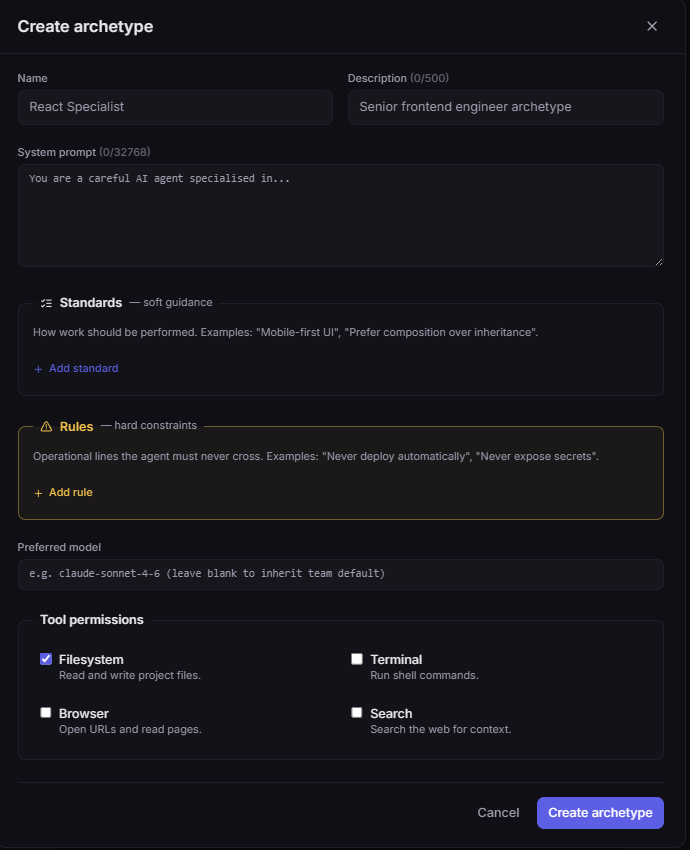
An Agent Team is a small set of role-scoped agents, each bound to an Archetype that defines its system prompt, standards, rules, model and tool permissions. The default team ships with these four roles. Fork any of them, tighten the rules, swap the model, or compose your own roles from scratch.
/blueprint Reads the ticket, writes a blueprint of the change: files touched, data model edits, test plan, risks.
Scope Read-only on your repo. Cannot commit.
/implement-task Implements the blueprint. Edits files, runs tests, iterates until the suite is green.
Scope Write access scoped to the ticket's branch.
/review-task Checks the diff against your standards: missing tests, drift from patterns, AI slop. Bad path loops back to Engineer.
Scope Read + grep. Cannot commit. Cannot approve PRs.
PR + status Opens the pull request, fills the description from the blueprint, posts the status update back to the source ticket.
Scope PR-create only. Human reviewer still merges.
Permissions live on the archetype, not the agent. The Engineer's archetype can edit; the Reviewer's reads but never commits, and that holds across every team that adopts them.
archetypes
Each role above is an Archetype: a workspace-scoped blueprint that any agent on any team can be bound to. Define a React Specialist, a Strict Planner, a Security Auditor once; reuse the definition across every team that needs it. Update the archetype, every agent bound to it picks up the change on the next session.
Standards vs Rules, separated by design
Standards are soft guidance for how work should be performed (mobile-first UI, prefer composition over inheritance). Rules are operational lines the agent must never cross (never deploy automatically, never expose secrets). Mixing them is how AI agents either ignore constraints or behave like bureaucratic toasters.
Reusable across agents and teams
One archetype can power many agents on many teams. The Backend team's Reviewer and the Mobile team's Reviewer can share the same blueprint, or fork their own. Tighten the standards once; every agent bound to it inherits the change.
Model + tools pinned per role
Set a preferred model per archetype (Sonnet for the Engineer, Haiku for the Reviewer) with team-default fallback. Restrict tool permissions per role: the Reviewer can read and grep, the Engineer can edit. Permissions live with the blueprint, not buried in agent overrides.
how it works
No new tracker to adopt, no orchestrator to babysit. Connect once, then assign work the way you already do.
OAuth into GitHub, GitLab or Azure Repos. Read-write scoped to the branches you allow.
Drop tickets onto the Agent Teams board, or sync a Notion / Jira / Linear / Azure DevOps view. Pick which lanes auto-run, which gate to humans.
Planner writes the blueprint. Engineer implements. Reviewer checks against your standards. Bad reviews loop back instead of forward.
PR opens against your repo, linked to the source ticket, with the blueprint and reviewer notes attached. You merge.
wired into your tracker
Agent Teams reads work items from where your team already lives. Pick up a ticket from Notion, Azure DevOps, Jira or Linear, watch the lane progress, get a PR opened in your repo. No double-entry, no extra board to maintain.
the pipeline
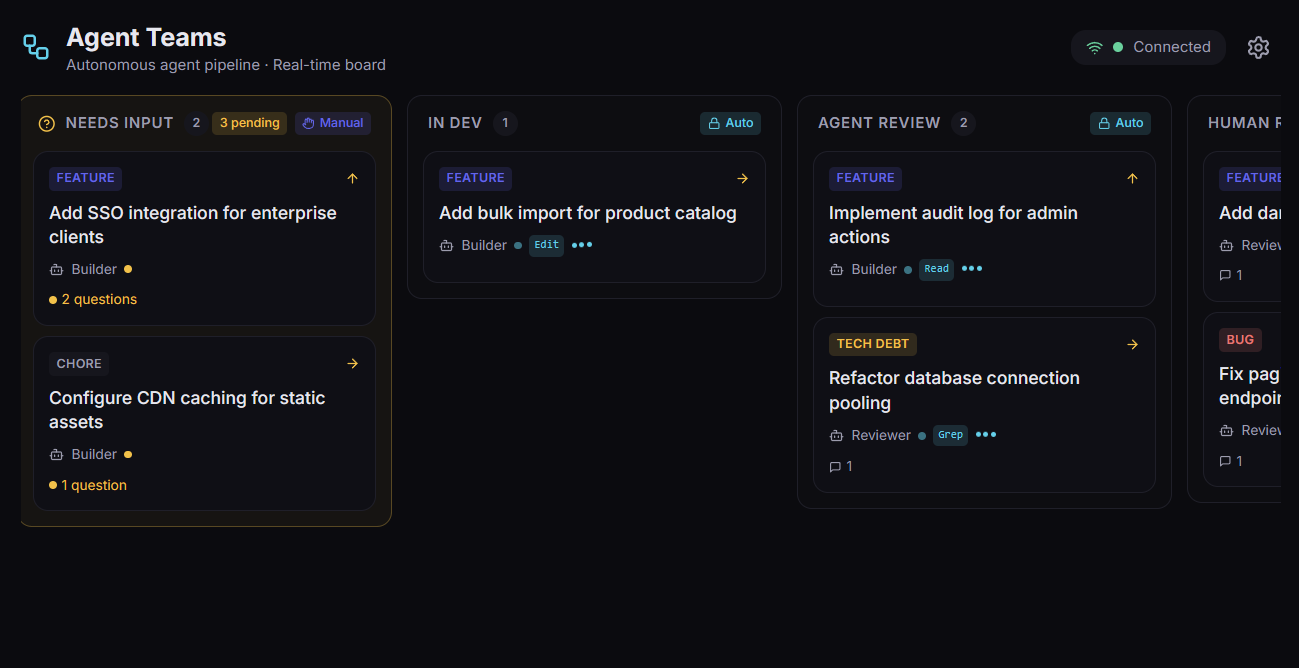
Each kanban lane is a stage in the development lifecycle. Auto lanes dispatch a Claude Code skill, manual lanes wait for human approval. Bad-path branching loops failing reviews back to the previous stage instead of forward.
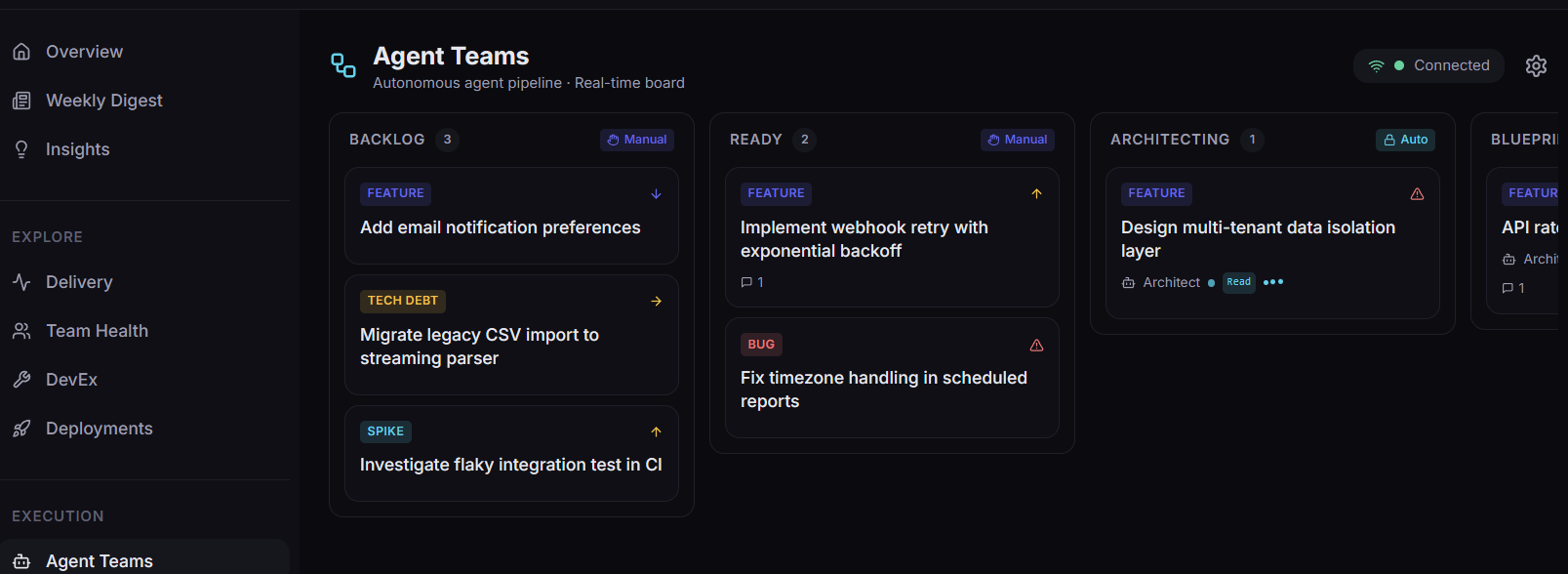
Tickets waiting on triage.
Triaged + approved for agent work.
Agent runs /blueprint and drafts the architecture.
/blueprint Human gates the architecture before any code is written.
Agent runs /implement-task and writes the code.
/implement-task Agent runs /review-task with scoring. Bad path loops to In Dev.
/review-task Human reviews the PR + agent output.
Escalation lane. Agent paused, awaiting decisions.
Merged + deployed.
your standards, enforced
Generic agents produce generic code. Agent Teams lets you declare design standards, architectural patterns, naming conventions, security baselines and review heuristics per project, and then per agent-team. The agent reads them before it writes a line.
Per-project profiles
Stack conventions, file-layout rules, allowed dependencies, lint config, ADR pointers. Different rules for the API repo vs the marketing site.
Per-team overrides
Backend team's review checklist differs from the mobile team's. Each Agent Team gets its own review heuristics layered over the project profile.
Patterns library
Curate canonical examples (auth flow, pagination, error handling). The agent matches new code to your patterns instead of inventing fresh shapes.
Practices and guardrails
Ban specific libraries, require tests at certain coverage, mandate docs updates. The agent is rejected at /review-task if it skips them.
two run modes
Agent Teams uses Anthropic's Claude Code under the hood. You decide where it runs: on your laptop with your existing auth, or in our cloud against a monthly token allowance.
Free with subscription
Run the agent on your own machine. Uses your existing Claude Code auth.
After two commands on a fresh laptop, the omnix-agent CLI opens a persistent WebSocket back to Omnix. Tickets dispatched on the board shell out to claude locally, using whatever Claude plan you already have. No extra Anthropic spend via us.
Metered allowance
We run the agent in our cloud. Capped monthly tokens, overage available.
One isolated container per session, no local install. Billed against a monthly token allowance per tier (similar to Claude Code Pro's $20-and-buy-more pattern). When you hit the cap, the session pauses cleanly and you can buy more from the banner without losing work.
live console
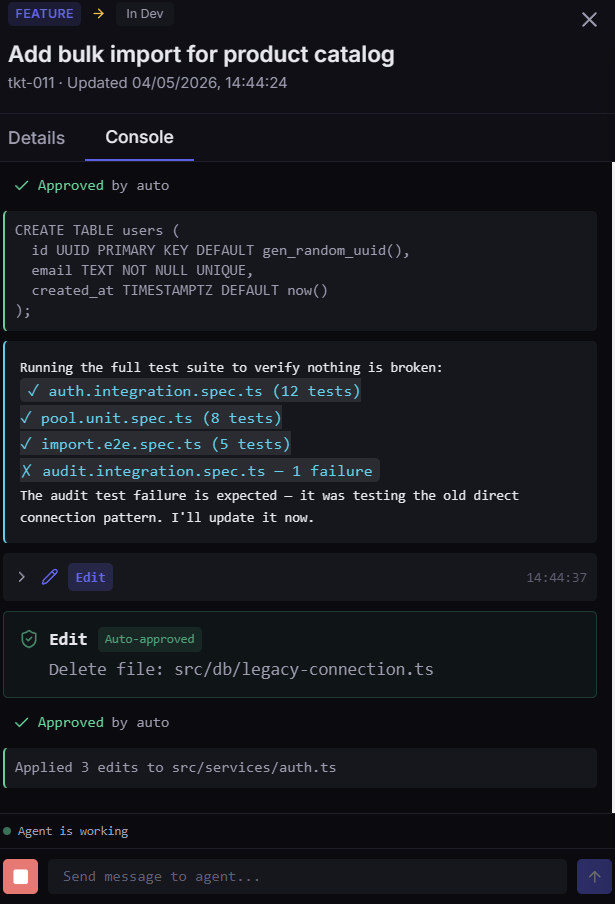
Every ticket has a streaming console. The agent's tool calls (file edits, test runs, git operations) surface in real time. Approve risky operations, edit messages mid-run, or send the agent a clarifying note without leaving the board.
Per-tool permission modes
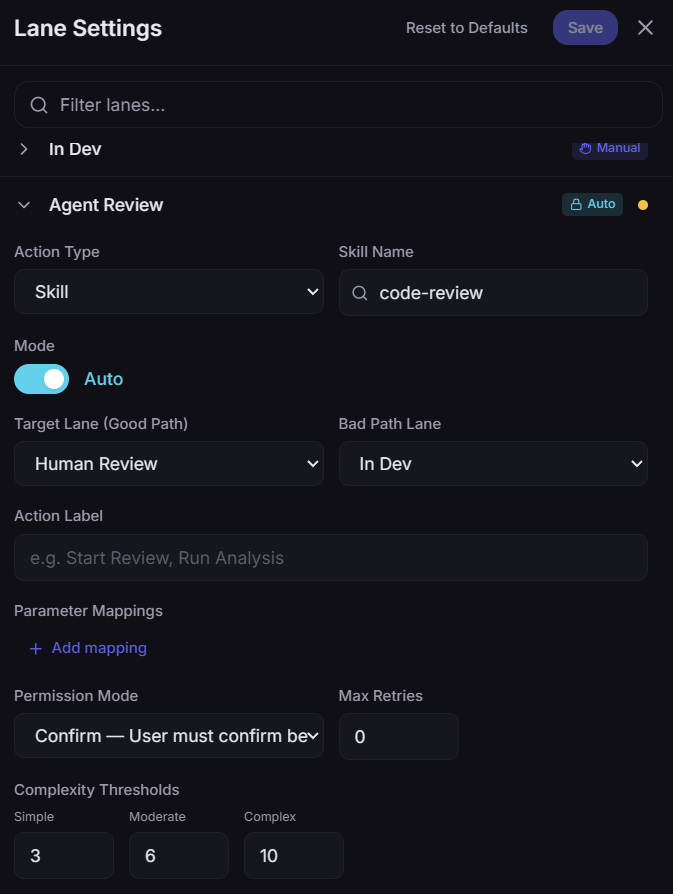
Confirm-before, auto-approve, or block, set per skill. Builders can edit, reviewers can read and grep but not commit.
Streaming output
stdout, file diffs, tool calls all rendered in the console as they happen. Same fidelity as running Claude Code locally.
Mid-run intervention
Send the agent a message, edit a previous prompt, or hit the kill switch. No need to wait for it to finish a wrong path.
configurable
Every lane is configurable: action type (skill or transition), permission mode, retry budget, complexity thresholds, target lanes for good and bad paths. Default to Confirm-before for sensitive lanes; auto-approve trusted skills.
boundaries
We're explicit about scope so you know exactly where Agent Teams help and where humans stay in charge.
They handle well-scoped tickets so your team can focus on the work only humans can do: design judgment, customer conversations, complex tradeoffs.
Burnout signals, on-call load, sprint slip causes: that's the Insights Layer. Agent Teams act on technical work, not org work.
Every ticket needs scope they can read. Vague feature briefs come back with clarifying questions, not speculative code.
PRs always go through your branch policy and human review. Agent Teams open the PR; a person on your team approves it.
Agent Teams don't replace your engineers. They handle the work that never gets prioritised.
how it fits with omnix
Omnix has two layers. The Insights Layer reads your delivery system and surfaces issues across code, delivery and people. Agent Teams are a separate execution layer that handles the technical subset of those issues, or any other work you assign.
With Omnix insights
Omnix surfaces a regression, a flaky test, a deprecated dependency. The action button on the insight files a ticket onto the Agent Teams board. The team picks it up.
Independent of Omnix
Drop a ticket on Notion, Jira, Linear or Azure DevOps the way you already do. Agent Teams will read it and run it. Omnix Insights doesn't have to be in the picture.
People-and-process insights stay with humans. Code-level insights can route to Agent Teams when you choose.
pricing
Agent Teams is a paid add-on on the Business tier. Base subscription unlocks BYO mode and the orchestrator. Hosted runner is metered: every Anthropic API call is attributed per team + ticket, with overage purchasable in 1M-token packs.
See pricing tiers
see it run
Tell us about your team and the kind of work you'd hand to an agent. We'll set up a guided session so you can see the BYO + Hosted modes side by side.